Birthdays & Anniversaries
From the 18th to the 80th birthday: The happy tears during speeches and the laughter around the cake appear immediately on the big screen. Explore our dedicated guide for the best moments of your birthday party.
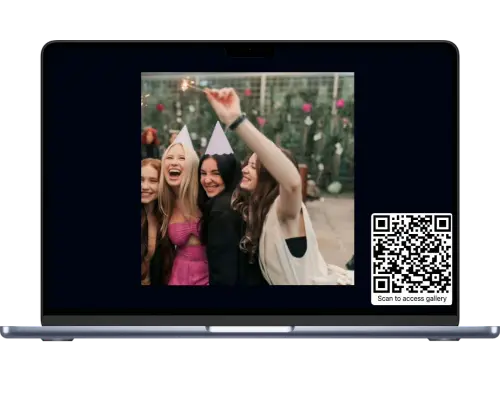
Your guests simply scan a QR code and share snapshots directly from their mobile browser. Moments later, the best photos and videos appear live on venue projectors or screens. Completely without apps, without registration, and 100% GDPR-protected.
Scan QR code
Point your camera
Opens instantly in browser
Sharing photos should spark laughter and bring people together on the dance floor, rather than leaving everyone isolated staring down at their own phones.
At celebrations, coworkers, school friends, neighbors, and relatives mingle together. In a WhatsApp group, everyone's personal phone number is publicly visible to strangers. Many guests prefer not to share their contact info and skip the group altogether. With FlashUp, every guest participates completely anonymously without accounts or phone numbers.
WhatsApp aggressively shrinks images and strips valuable camera EXIF data. What looks acceptable on a tiny phone screen appears blurry and muddy when projected or printed into a photo book. To see why chat groups fail for events, read our guide on 5 reasons why WhatsApp doesn't work for event photos. FlashUp saves every capture at full resolution.
WhatsApp uploads sit quietly in people's pockets. The FlashUp live slideshow on screens turns into a natural magnet in the venue: guests gather around, laugh over dance floor candid shots, and strike up conversations. The next morning, you download the entire archive in one click as a clean ZIP package.
No technical setup, no app downloads, no lost memories.
Set up your gallery in under a minute. Instantly download print-ready cards in A6 and A7 formats featuring your personal QR code for cocktail bars, high-tops, or entry tables.
Table cards & stands
Guests simply scan the card with their standard smartphone camera. The private gallery opens right away without app downloads. Pick photos or videos, tap send, done.
Pictures stream live on the projector. Over breakfast the next morning, download all original uncompressed photos and videos with full metadata in one organized archive.


Every celebration tells its own story. Ensure none of these candid perspectives get lost.
From the 18th to the 80th birthday: The happy tears during speeches and the laughter around the cake appear immediately on the big screen. Explore our dedicated guide for the best moments of your birthday party.
High energy on the dance floor, creative costumes, and unposed moments. Place a single QR card by the bar and let guests share their photos naturally.
Celebrate together outside the office: 100% GDPR-compliant without exchanging personal phone numbers. Learn more in our guide to the digital event gallery for corporate events.
Capturing emotional farewells, ball gowns, and celebrations. Keep every class memory united in one permanent archive without losing files in message threads.
Shared excitement over tournament victories, sideline barbecue moments, and award ceremonies captured for community archives and newsletters.
Experience your celebration from every guest's perspective. Includes custom table card stationery and photo scavenger hunts. Explore our specialized gallery for your wedding.
Smart tools so you can focus completely on celebrating with your guests.
Connect your laptop to any projector or smart TV via HDMI. The slideshow runs full-screen in standard browsers. As soon as a guest shares a new photo, the slideshow transitions naturally without needing manual page refreshes.
You remain in total control: choose between streaming uploads instantly to the screen or activating moderation mode, where photos appear on display only after your quick approval in your admin dashboard. Inappropriate photos can be removed with a single tap.
Some party moments require motion: guests can upload short video clips of toasts, speeches, and dance floor routines alongside full-resolution photos.
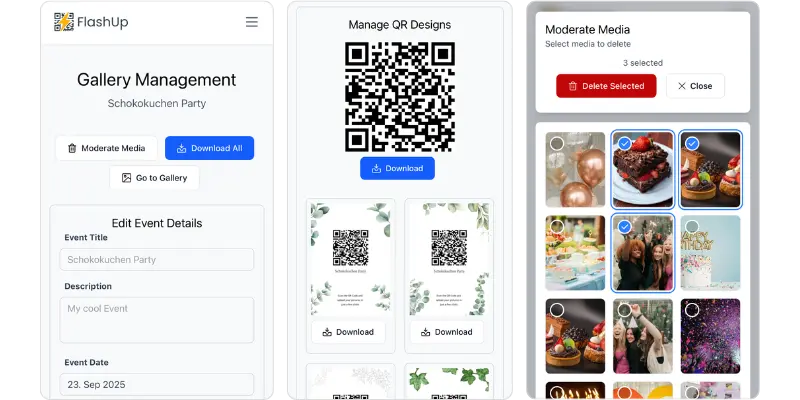
The intuitive host dashboard: live photo moderation, launching the slideshow, and one-click album download
Three simple strategies to ensure all your guests participate enthusiastically throughout the night.
Place printed stands where guests pause with their smartphones in hand: directly on the bar next to drink menus, on cocktail high-tops, by the entryway, and on tables in the lounge area.
Ask your DJ or host for a quick early announcement: "Upload your photos via the cards at the bar and your photos will appear live on the big screen!". Once the first funny snapshots light up, participation takes off naturally.
A standard laptop connected via HDMI cable to the venue projector or TV is all you need. Open the gallery link in full-screen mode (F11 on Windows or Ctrl+⌘+F on Mac). Uploads stream over guests' cellular data without needing local venue Wi-Fi.
No subscription. No hidden fees. Pay once, keep forever.
Ideal for all parties, birthdays, corporate events, graduation balls, and community celebrations.
No recurring charges · Instantly active
Create your galleryIncluded in every gallery:
Everything you need to know for a smooth celebration.
Helpful step-by-step guides and tips for candid guest photos, QR codes, and memories.
Combine personal wishes and candid guest photos into an interactive keepsake without paper mess.
GDPR-compliant photo wall with live slideshow and moderation for corporate parties, galas, and festivals.
Compression quality loss, exposed phone numbers, and clutter: Why private QR galleries are the superior choice.
Bring an interactive highlight to your celebration. Ready in under one minute, with zero apps and zero registration for your guests.